
The Legend of Zelda Trading Cards (Enterplay, 2016)
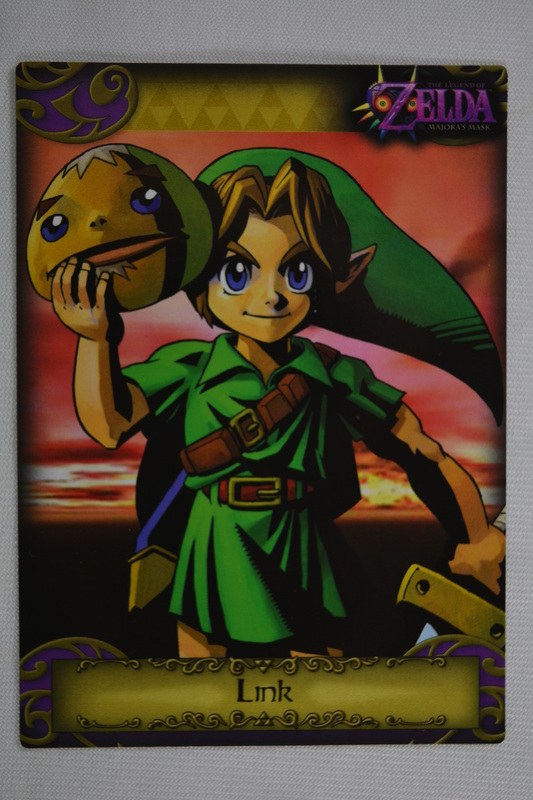
The Legend of Zelda Trading Cards (Enterplay, 2016) — from The Enterplay Years in the Zelda Cards Gallery.
| Set line | Enterplay The Legend of Zelda (2016) |
|---|---|
| Maker | Enterplay |
| Country | United States |
| Released | Late September 2016 · Australia and New Zealand followed |
| The pieces | 138 pieces — 85 base + 23 silver foil parallels (Nos. 86–108) + 9 gold foil (G1–G9) + 12 decals (D1–D12) + 9 FunTats tattoos |
| Checklist | Complete — the manufacturer checklist survives |
Five games in one checklist — Ocarina of Time, Majora’s Mask, Twilight Princess, Skyward Sword and A Link Between Worlds, about eighteen slots per game including each game’s key-art card. The gold structure is the set’s signature: G1–G4 came in packs, G5–G8 were box toppers in hobby displays, and G9 Midna was never in a pack at all — she was exclusive to the Collector’s Fun Box. The art is game screenshots and renders throughout, the inverse of the painted Japanese sets of 1998–99.
No.14 (Ocarina key art) and No.32 (Majora’s Mask key art) are silver-foil cards whose foil photographs almost flat — every copy is foil, including copies whose listing photos look flat. Identity rests on card number, art and label, never on a photograph’s shine.
This is the only Zelda set where a checklist card (G9) was never sold in a pack — the Fun Box is a required "pack" for completion.
More from this set line: Zelda Trading Cards — Display Box (2016) · Zelda Trading Cards — Pack Wrappers (2016) · Collector’s Fun Box (2016). The 2016 Enterplay set, in the Library.
Shown here at its verified native size, 533×800, the largest honest copy the Library holds for this object.
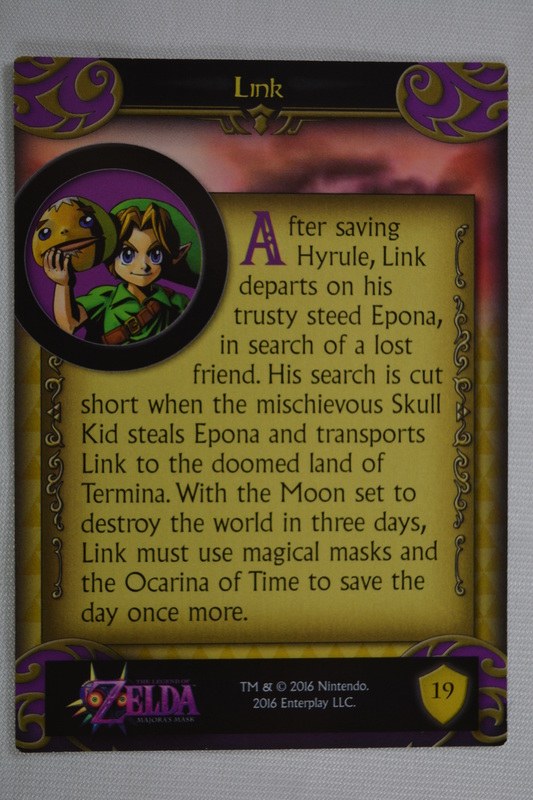
This object's back is verified too: use the flip control on the image to see it.
The back of card #19 — the number sits in a gold shield at upper right — opens "After saving Hyrule, Link departs on his trusty steed Epona, in search of a lost friend...", with a portrait inset matching the front art.
THE FIRST WORD
New pages and new pieces, first.
 Want SOJ on your home screen?
Add SOJ to your home screen
- 1Tap the Share icon in Safari’s toolbar.
- 2Scroll down and tap Add to Home Screen.
- 3Tap Add — SOJ is on your home screen.
- 1Tap the menu (the ☰ icon) and open this page in Safari — Apple only allows home-screen adds from Safari.
- 2Tap the Share icon in Safari’s toolbar.
- 3Scroll down and tap Add to Home Screen, then tap Add.